Cabinet shop management software for the work happening today
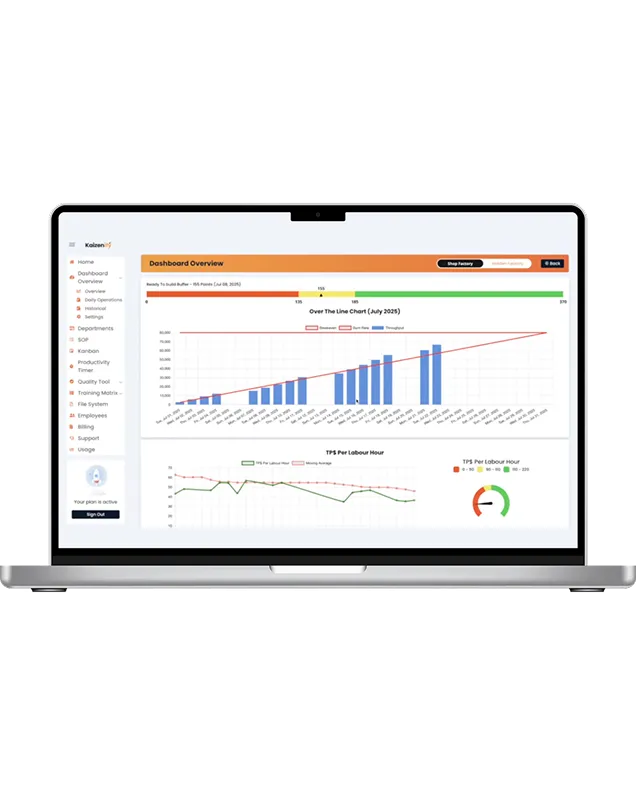
The drawings are ready. The crew is busy. But are you completing enough work, fixing the right problems, and keeping the next station supplied? Kaizenify brings daily production, quality, Kanban, SOPs and training into one suite for custom cabinet and millwork shops.
Start with the question your shop cannot answer
A job can be on the schedule and still spend the afternoon waiting for hinges. A cabinet can reach assembly and still need a remake. A full order book does not tell you whether today's work moved the business forward.
Kaizenify is built around those daily decisions: compare completed output with your target, make recurring defects visible, organize replenishment, document repeatable work, and see where training coverage is thin. Choose the tool that addresses the interruption you can identify today.
Six tools, one daily management routine
- DashboardWhat did we complete, and how does it compare with our production target?
- Quality TrackingWhich recurring defects and downtime problems should we investigate first?
- KanbanHow can we make replenishment signals and supplier information easier to find?
- SOPsWhere can the team find the current procedure for this task?
- Andon/TimerWhat does timing and visual status tell us about the work?
- Training MatrixWho is trained, and where do we need another capable person?
AI Video SOP supports the SOP workflow by turning a recorded walkthrough into a draft procedure. Review that draft against the actual process before using it to train anyone. SOPs are one part of the suite; the dashboard and quality tools keep attention on output and improvement.
Every job is custom. Your measurement can still be consistent.
Counting one basic cabinet and one detailed vanity as equal pieces can hide the difference in work mix. Kaizenify's published points approach starts with job value less material cost, divided by 100. It gives your team a consistent way to express output without treating every item as identical.
Points are a management measure, not a calculation of net profit or a substitute for job costing. Agree on what counts as completed work and apply the same rule each day. The custom-output guide explains the method.
Keep the systems that already do their job
Kaizenify does not provide cabinet design, CAD/CAM, production scheduling, job costing, accounting, purchasing/AP, or work-order management. Keep those functions in the systems your business uses for them.
Using tools alongside each other does not necessarily mean they exchange data automatically. If a particular integration is essential, establish that requirement before choosing a system. Our software comparison separates daily management from the other jobs software needs to do.
| If your immediate need is... | Start by evaluating... |
|---|---|
| Drawings, cut lists, design or machine output | Cabinet design and CAD/CAM tools |
| Job sequencing and promised delivery dates | Scheduling or job-management tools |
| Costs, purchasing and financial records | Appropriate costing, ERP or accounting tools |
| Daily output, recurring problems, standards and training | Kaizenify's daily management suite |
What this looks like in a cabinet shop
Consider an illustrative shop that keeps finding chipped edges during assembly. Its first step is to log what happened, where the issue was found, the suspected origin, and the rework involved. The team investigates the recurring pattern, updates the relevant instruction, and checks whether the issue repeats.
At the same time, the supervisor compares completed output with the daily target. If output improves, the team can investigate whether less rework contributed. This is a way to connect a specific problem with a daily result, rather than assuming that more activity means more useful output.
See the tools in a customer walkthrough
Watch a customer and the Kaizenify team review bottleneck downtime, recurring defects and daily production comments using Dashboard and Quality.
Watch the customer walkthrough. The recording discusses production opportunity lost during downtime, not verified savings or guaranteed results.
A practical starting point
- Choose one problem your team recognizes.
- Agree on the information needed to understand it.
- Name the person responsible for keeping that information current.
- Review it with the people doing the work.
- Make one change and check what happens.
You can start with the free templates, explore the dashboard and quality tool, or book a demo focused on your workflow.
Common questions
Can we use Kaizenify with paper work orders?
Yes. A paper work order follows an individual job. Daily production measurement, defect tracking, SOPs and replenishment signals address different needs. You do not need to replace every part of your current process to begin improving one of them.
Is Kaizenify only SOP software?
No. SOPs are one of six core tools. The suite also covers the dashboard, quality tracking, Kanban, the Andon/Timer, and the training matrix.
Does the points method tell us our actual profit?
No. Points express job value after material cost on a consistent scale. Actual profit also depends on labor, overhead and other expenses. Use the points method for production visibility, alongside your financial records.
What if our team is reluctant to use a new system?
Begin with a recurring frustration they want removed, involve them in the routine, and show what action follows their input. The adoption guide gives a practical starting sequence.
Choose your next step
Compare the kind of software you need, or focus on a specific part of daily shop management.
See where Kaizenify fits in your shop
Bring one real production problem to the conversation. Start with the tool that helps you understand and act on it.