What kind of production tracking do you need?
The phrase can mean several things. Some systems track every job through each station. Others collect signals from machines. A daily production dashboard answers a different question: did the shop complete the output it needed, and what explains the gap?
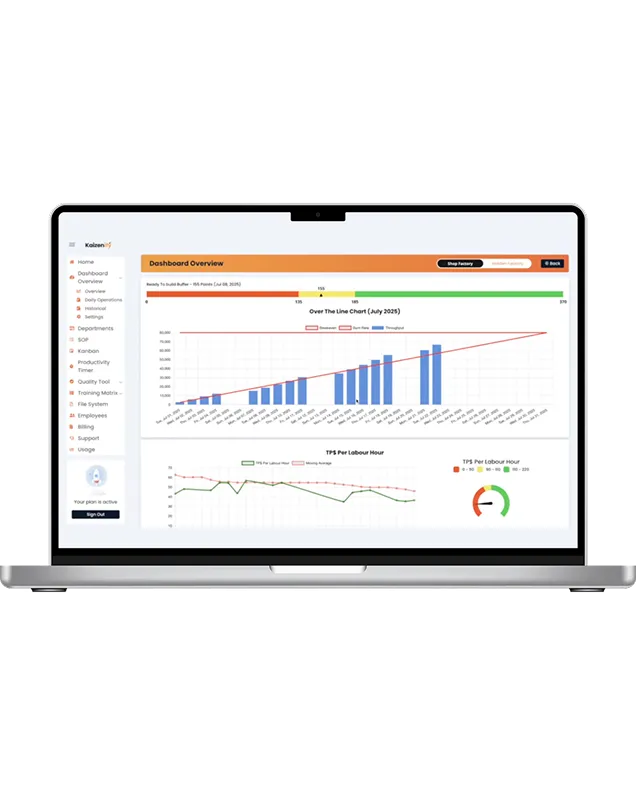
Kaizenify supports daily production targets and actual output, throughput per labor hour, minutes per piece and related floor-management tools. It does not provide work-order management, production scheduling or automatic machine-data collection.
Choose the kind of tracking that matches the decision you need to make.
Start with a completion rule
“Done” needs to mean the same thing to everyone entering the number. Is a cabinet done when assembled, when inspected or when ready for shipment? Choose the boundary that fits the result you are managing.
Then keep three rules visible:
- Count accepted output at the agreed boundary.
- Keep rework visible instead of counting it again as new output.
- Use the same unit for the target and the actual result.
In a hypothetical shop, twelve cabinets are assembled but two still need repair. If the completion rule is “assembled and accepted,” the output is ten. The two unfinished cabinets remain visible as work to resolve.
Which measures belong in the daily view?
| Measure | What it tells you | What it does not establish by itself |
|---|---|---|
| Actual output against target | Whether the agreed production goal was met | Why a shortfall happened |
| Output per labor hour | Output relative to the labor time included | Net profit or individual effort |
| Minutes per piece | Time relative to a consistent unit | A fair comparison between unlike jobs |
| Defects and rework | Work that needed correction | The cause without investigation |
| Downtime by reason | Where interrupted time accumulated | Whether the first recorded explanation is correct |
Avoid adding measures simply because a dashboard can display them. The manufacturing KPI guide helps connect a number to a decision.
How does Kaizenify connect output with improvement?
Start with the Dashboard to review the target and actual output. Use Quality Tracking to examine recurring defects and downtime. The productivity timer provides another way to observe process status and establish a baseline.
Then address what the information shows. A repeated material shortage may call for Kanban replenishment. A method that varies between operators may need an accessible SOP and training. A slow handoff may need a different readiness rule.
The software supports the routine. Someone still needs to investigate, own the action and check the result.
What if every job is custom?
Raw unit counts can be misleading when a simple shelf and a raised-panel vanity count equally. Use consistent categories or a weighted method and keep its assumptions visible.
The custom-work output guide explains the job-points method already used in Kaizenify's shop-management material. It is a value-based production measure, not a replacement for job costing or a direct measure of profit.
Compare performance over a consistent scope. A change in product mix can change minutes per piece even when the process itself has not become better or worse.
Can you start with a spreadsheet?
Yes. The daily production report template lets you establish definitions and a review habit before introducing more software.
Move to a shared system when separate files, repeated entry or missed updates make the routine difficult to maintain. Preserve the definitions the team already understands. The software adoption guide covers ownership and a manageable rollout.
What does a useful daily review look like?
Compare yesterday's accepted output with the target. Look at the largest recurring interruption or defect. Choose one action, name its owner and set a time to check it.
For example, if assembly repeatedly waits for drawer slides, raising the output target does not fix the shortage. Check the replenishment signal, delivery lead time and ownership first.
Use the daily huddle guide to keep the review short and the follow-through visible.
Common questions
Is production tracking the same as production scheduling?
No. Scheduling decides the sequence and timing of planned work. Production tracking records what happened and helps explain the result. Kaizenify does not provide scheduling.
Does Kaizenify track individual work orders?
No. Keep work-order management in your existing system or paper process.
Will the dashboard calculate our accounting profit?
Daily production measures are not an accounting profit statement. Keep job costing, overhead and financial reporting in the appropriate systems.
Can our team use it alongside an ERP?
Yes, as a separate daily management routine. Confirm how information will be entered; no automatic ERP integration is implied.