Manufacturing KPIs for Small Shops: The 5 Numbers That Tell You If You Made Money
Search "manufacturing KPIs" and you'll get lists with 25, 30, sometimes 50 metrics: OEE, takt time, first-pass yield, inventory turns, schedule attainment, cost per unit, and on and on. Those lists were written for plants with a controller, an IE department, and an ERP that spits the numbers out automatically.
If you run a custom cabinet or millwork shop with somewhere between 1 and 200 people on the floor, that list is worse than useless. You'll try to track eight of them, keep it up for three weeks, and go back to walking the floor and guessing.
Here's the alternative that actually holds up in a shop: five numbers, checked every day, most of them by lunch. If these five are moving the right way, you made money. If one of them isn't, you know exactly where to look.
Why five, and why daily
A KPI only works if it changes what someone does today. A monthly P&L tells you what happened; it can't tell you what to fix on Tuesday. The five metrics below are chosen because each one points at a specific place on the floor and a specific action. Together they cover the whole business: are we producing enough, are we shipping on time, are we throwing work away, are people productive, and can we get the material we need.
Daily is the other non-negotiable. A number you check once a week is a report. A number you check every morning is a management system.
1. Throughput: target vs. actual, by day
This is the headline number and the one you look at first. Throughput is what your shop completed today, measured against what it needed to complete today.
The unit is up to you: cabinet boxes, doors, drawer fronts, "cabinet equivalents," or dollars of shipped value. What matters is that it's the same unit every day and that you have a daily target. Most shops set the target from capacity (what a normal crew produces on a normal day) and adjust when the crew or the schedule changes.
Why it's first: throughput is the single number that connects the floor to the bank account. If you're hitting the target every day, revenue is on track. If you're consistently short, nothing else you measure will save the month.
What it points at: a throughput miss sends you to look at whichever cell had the bottleneck that day. Over a week, the same cell keeps showing up. That's your first improvement project.
2. On-time delivery
Percentage of jobs (or orders, or installs) that shipped by their promised date. Track it as a running number, not a monthly average, so a bad week shows up while you can still do something about it.
Why it matters: late orders are the way most shops first realize they're in trouble. "Struggling to get stuff through the shop" and "late on orders" is how owners describe the problem before they know what to call it. On-time delivery is the number that makes that feeling measurable.
What it points at: if throughput is fine but on-time is falling, the problem isn't capacity, it's sequencing or promise dates. If both are falling, it's capacity.
3. Defects, rework, and their cost
Count of defects found each day, where they were found, where they were caused, and the hours or dollars of rework they generated. This is the metric most small shops don't track at all, and it's usually where the money is hiding.
Why it matters: rework eats capacity twice. It consumes the hours to redo the work, and it consumes the throughput those hours would have produced. A shop that reduces defects almost always sees throughput rise without adding a single person. Cost of poor quality is its own topic; the short version is that most owners are shocked by the number the first time they see it.
What it points at: the single most common defect source. Fix that one. Then the next. Two weeks of honest logging is usually enough to see it.
4. Labor productivity
Real production hours against paid hours, or throughput per labor hour. The point isn't to police people; it's to see where time goes. A cell that's producing half of what its hours suggest usually has a reason (waiting on material, hunting for information, redoing something) and that reason is fixable.
Why it matters: labor is the biggest cost in a custom shop, and it's the one where "busy" and "productive" get confused most easily.
What it points at: the cells where the gap between paid hours and productive hours is largest. Pair it with the defect number and the material number and the cause usually becomes obvious.
5. Inventory health: stockouts and reorder status
How many times this week did someone stop because a part, hardware, edgebanding, or a sheet wasn't there? And what's the reorder status of your stocked items right now?
Why it matters: a stockout is a throughput miss with a delay. The saw stops, the job moves to the side, and the schedule slides. Shops that run a Kanban card system (a visual reorder card for every stocked item, pulled when the bin hits its reorder point) essentially eliminate stockouts, because purchasing sees the signal before the shelf is empty.
What it points at: the items that keep running out, and whether the reorder points are set right.
How to read the five together
Individually each number is useful. Together they explain the shop:
- Throughput down, on-time down, defects up: quality is eating your capacity. Start there.
- Throughput down, defects fine, productivity down at one cell: that cell is waiting on something. Go find out what.
- Throughput fine, on-time slipping: promise dates or sequencing, not the floor.
- Stockouts up: nothing else will look good until material is reliable.
That's the whole method. Five numbers, one screen, a five-minute look every morning, and a specific place to go when one of them is off.
What "by lunch" means
The daily target only works if you check progress before the day is over. A shop that looks at throughput at 4:30 finds out it missed. A shop that looks at 11:30 finds out it's behind and moves people, pulls a job forward, or fixes the bottleneck. Same data, different outcome. Whatever tool you use, the number needs to be visible mid-shift, not just at close.
How to start this week, on paper
You don't need software to start. You need a whiteboard and a decision.
- Pick your throughput unit and set tomorrow's target.
- Put five columns on the board: throughput (target/actual), on-time, defects logged, hours (paid/productive), stockouts.
- Fill it in at end of shift for two weeks. Assign one person per column so it happens.
- Look at it every morning as a group. Two minutes.
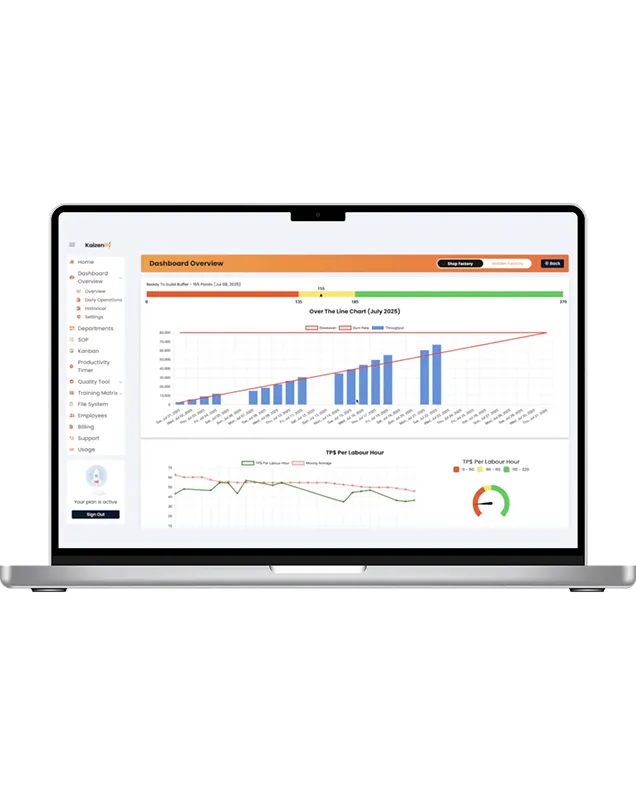
After two weeks you'll know which of the five is your problem. You'll also know why shops eventually move this off the whiteboard: the numbers only stay honest when they're easy to enter and impossible to lose. That's what a shop floor production dashboard is for: the same five numbers, entered at the cell, visible on every screen, target vs. actual by day.
Frequently asked
Which single KPI should a small shop start with? Throughput target vs. actual by day. Everything else explains why throughput moved.
How is this different from OEE? OEE is built for equipment-heavy production with long runs. In a custom shop the constraint is usually people and information, not machine availability. Throughput, on-time, and defects tell you more.
How much time does daily tracking take? A few minutes per area at end of shift, and two minutes as a group in the morning. If it takes longer than that, the system is too complicated.
Do I need software for this? Not to start. You need it once the whiteboard stops being honest, when someone's out and the column goes blank, or when you want to see the trend over a month instead of remembering it.
Lynn
Co-founder, Kaizenify
Co-founder of Kaizenify. Works with cabinet and millwork shops on lean daily management.