Kanban Card Template for a Cabinet Shop (Free Printable + Reorder Points)
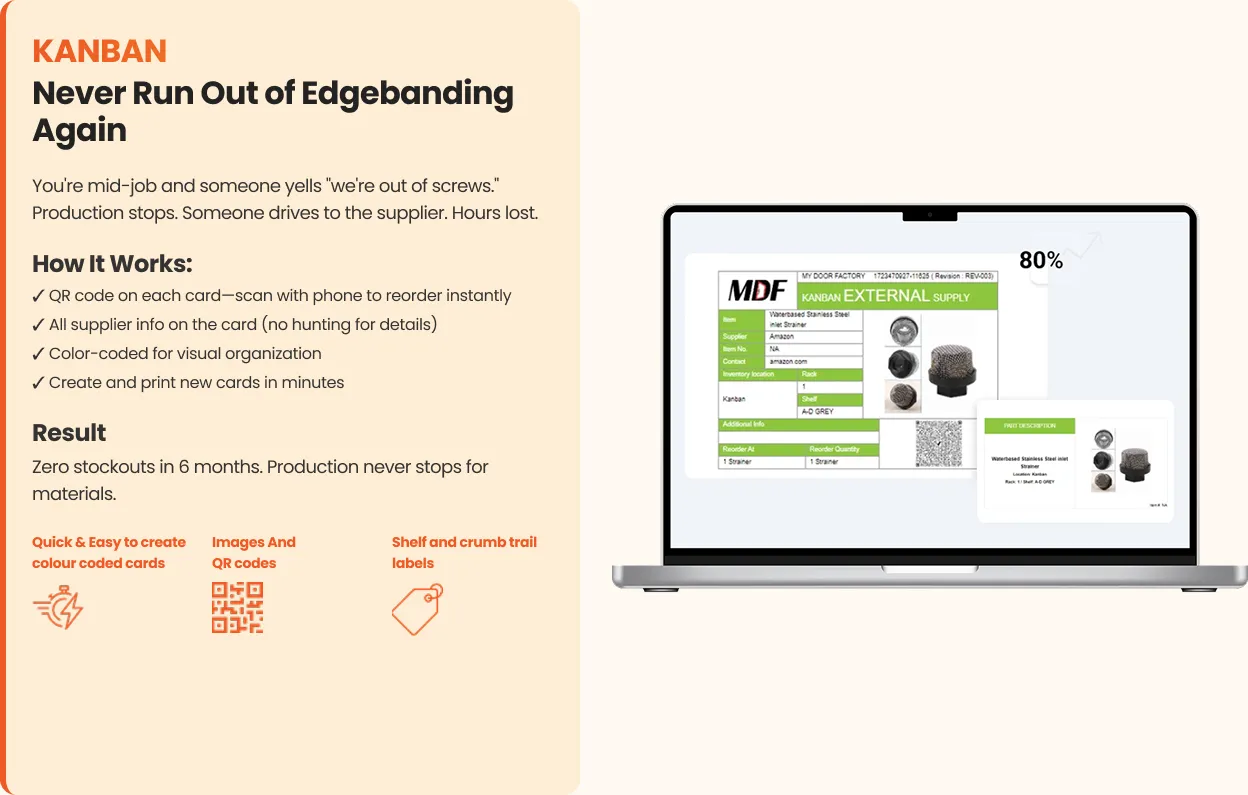
A Kanban card is the simplest inventory system that actually works on a shop floor. It's not software and it's not a count — it's a card in a bin that says "when you see me, order this." Shops that put cards on their stocked items stop running out of hinges, slides, edgebanding, and screws, and purchasing stops guessing.
Here's what goes on the card, how the two-bin method works with a hardware example, and how to set the reorder point — with a printable template.
What a Kanban card is (and isn't)
A Kanban card is a reorder signal. It sits at the reorder point in a bin or on a shelf. When someone reaches it, the card comes off and goes to a hook or a box marked "order." Purchasing takes the cards, orders exactly what's on them, and puts the cards back when stock arrives.
It is not a perpetual inventory ledger. You don't count what's on hand. That's the point: the card makes the count unnecessary for stocked items, because the reorder point does the deciding. If you're weighing this against inventory software, we've written a plain comparison of what each does.
Two-bin, with a hardware example
The cleanest version for small parts is two bins.
Say a shop uses about 40 pairs of a soft-close slide a week and the supplier delivers in about a week. Two bins of 60 pairs each. Crew pulls from bin A. When bin A is empty, they pull the card from it, drop it on the order hook, and start on bin B. Purchasing orders 60. They arrive before bin B runs out; the card and the refilled bin go back behind B.
Nobody counted anything. Nobody ran out. The card carried the whole decision.
For sheet goods, edgebanding coils, or finish, the same idea works with one bin and a marked reorder point — the card sits at the level (the third coil from the bottom, the fifth sheet) where ordering now means the stock arrives before you're out.
What goes on the card
Everything purchasing needs to order without asking a question:
- Item — description and any spec (color, size, finish).
- Part number / SKU and supplier.
- Location — which bin, which shelf, which rack.
- Order quantity — how many to order each time.
- Reorder point — the level the card sits at.
- Lead time — days from order to arrival.
- Optional: photo of the item, a barcode, the last order date.
Laminate it. Cards that aren't laminated last a month.
Setting the reorder point (with an illustrative example)
Reorder point = daily usage × lead time in days + a safety buffer.
Illustrative only: a shop uses about 8 pairs of a slide per day; the supplier takes 5 working days. 8 × 5 = 40, plus a buffer for a busy week or a late truck — say 20 — gives a reorder point of 60. Order quantity is a separate decision: often two to four weeks of usage, or the supplier's case size, whichever makes sense.
Two practical notes. First, rough usage is fine to start; you'll adjust after the first month. Second, if you don't know usage at all, set the card at "half a bin" and see how it goes — a card that's slightly wrong still beats no card. The full method, with three worked examples, is in the reorder point formula post.
Printing, placing, and running it
Print the cards from the template, laminate, and place each at its reorder point — clipped to the bin, taped at the shelf level, or as a divider in the coils. Show the crew the one rule: when you reach the card, it goes on the hook. Purchasing checks the hook daily.
Start with the ten to thirty items you run out of most. Not everything. The list is easy: ask the crew what they run out of and they'll tell you in a minute. Once those are covered, add the rest a few at a time.
From cards to a system
Physical cards run a small shop's inventory for years. They get harder to manage when there are a few hundred of them, when a supplier changes and thirty cards need reprinting, or when purchasing wants to see all the "order" cards from their desk instead of the hook. That's when the cards move into a system: same cards, printable, updated centrally, with the reorder status visible on the Kanban inventory tool alongside the rest of the shop's numbers.
Template
The printable sheet has four cards per page with all the fields above; the spreadsheet lets you fill in a list of items and print the cards in bulk. Free, no email.
Frequently asked
What is a Kanban card in manufacturing? A reorder signal placed at the reorder point in a bin. When it's reached, the card goes to purchasing, who order what's on it. It replaces counting for stocked items.
How do I calculate the reorder point for a Kanban card? Daily usage × lead time in days, plus a safety buffer. Rough numbers to start; adjust after a month.
What's the two-bin Kanban system? Two bins of the same item. Pull from A; when A is empty, its card goes to purchasing and the crew pulls from B. The refill arrives before B runs out.
Do Kanban cards replace inventory software? For stocked shop items, largely yes. They don't do purchasing, accounting, or job costing — that's a different category, covered in our comparison.
Lynn
Co-founder, Kaizenify
Co-founder of Kaizenify. Works with cabinet and millwork shops on lean daily management.