How to Measure Throughput in a Shop (and Set a Daily Target)
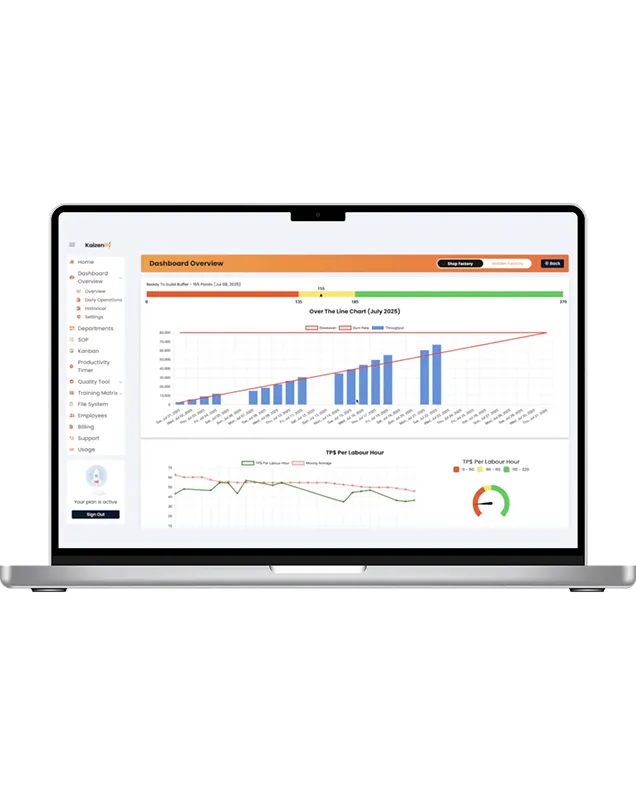
Throughput is the single number that connects the shop floor to the bank account. It's also the number most small shops don't have — they know how busy they are, they know roughly what shipped this month, but they can't say at 11am whether today is on track.
Here's how to measure it in a way that fits a custom shop, how to set a target that means something, and what to do when you miss.
What throughput is (and isn't)
Throughput is what the shop completed — finished and ready to ship or install — in a period. Not what was started, not what's in progress, not hours worked. Completed.
That distinction matters more than it sounds. A shop can be flat out and have low throughput, because everything is 80% done and nothing is leaving. Measuring completed work is what exposes that.
Throughput vs. output vs. capacity
Three words that get used interchangeably and shouldn't be:
- Throughput — what actually completed in the period.
- Output — often used to mean units produced at a station, whether or not the job finished. A cell can have high output and the shop low throughput.
- Capacity — what the shop could complete in the period with a normal crew and no problems. Throughput divided by capacity is how well you're using what you have.
You measure throughput daily, use capacity to set the target, and treat the gap between them as the shop's improvement backlog.
Picking the unit for a cabinet shop
The unit has to be something you can count at end of shift without an argument. Common choices:
- Cabinet boxes / units. Simple, but a tall pantry and a drawer base aren't equal work.
- Cabinet-equivalents. Weight the box types (a base = 1, a tall = 1.5, a drawer base = 1.3, etc.). More accurate; needs a one-time table.
- Doors and drawer fronts. Good for door shops or the finish cell.
- Dollars shipped. Best for the owner's question — did we make money — but lags the floor and can hide a bad mix day.
Most shops land on cabinet-equivalents for the floor and watch dollars weekly. Whatever you pick: same unit every day, agreed on by the people entering it.
Setting the daily target from real capacity
Don't set the target from what you'd like. Set it from what a normal crew produces on a normal day. Take three or four typical recent weeks, total the completed units, divide by days worked. That's your baseline capacity. Set the target there, or slightly above, and adjust when the crew or the schedule changes (someone out, a rush job, a machine down).
A target set from wishful thinking gets missed every day and the crew stops looking. A target set from real capacity gets hit most days, and a miss means something.
Tracking actual by shift
End of shift, whoever runs the area writes down completed units. That's it. If you want it more precise, a productivity timer at the cell captures job start and stop times, so completed work and real cycle time land automatically instead of by memory — that's how it works in the dashboard, where target vs. actual updates through the day.
The mid-shift check is the habit that makes throughput useful: at 11am, are we on pace? If not, there's still half a day to move people, pull a job forward, or clear the bottleneck.
Reading a miss
When actual comes in under target, look at three things in order:
- Which cell was the bottleneck? Where did work pile up? Over a week the same cell shows up.
- Was it rework? Check the defect log — hours spent redoing work are hours that didn't produce throughput.
- Was it waiting? Material stockout, missing information, machine down.
Nine times out of ten the answer is one of those three, and it's the same one repeatedly. That's the improvement project.
Trend, not day
A single day's miss is noise. A week's pattern is signal. Keep the daily numbers, but make decisions on the weekly trend: is throughput rising, flat, or falling against target? That's the number that tells you whether the improvements are working — and it's the one to put on the wall. The rest of the metrics that explain a throughput move are in the five KPIs for small shops.
Frequently asked
How do you measure throughput in manufacturing? Count completed, shippable units per period against a target set from real capacity. In a custom shop, cabinet-equivalents per day is a common unit.
What's the difference between throughput and output? Throughput is finished, shippable work. Output usually means units produced at a station, finished or not. A shop can have high output and low throughput.
How do I set a daily production target? From baseline capacity: completed units over three or four normal weeks, divided by days worked. Adjust for crew and schedule changes.
How often should throughput be checked? End of every shift for the record, and once mid-shift so a bad day can still be saved.
Lynn
Co-founder, Kaizenify
Co-founder of Kaizenify. Works with cabinet and millwork shops on lean daily management.